Reading a payment slip
Tenants often pay by transfer and send a screenshot of the slip. Letnook reads the bank reference from the slip's code and credits the space you choose.
Credit a slip
-
1Open
Open Read a slip
On Collect, tap Read a slip.
-
2Choose
Choose the screenshot
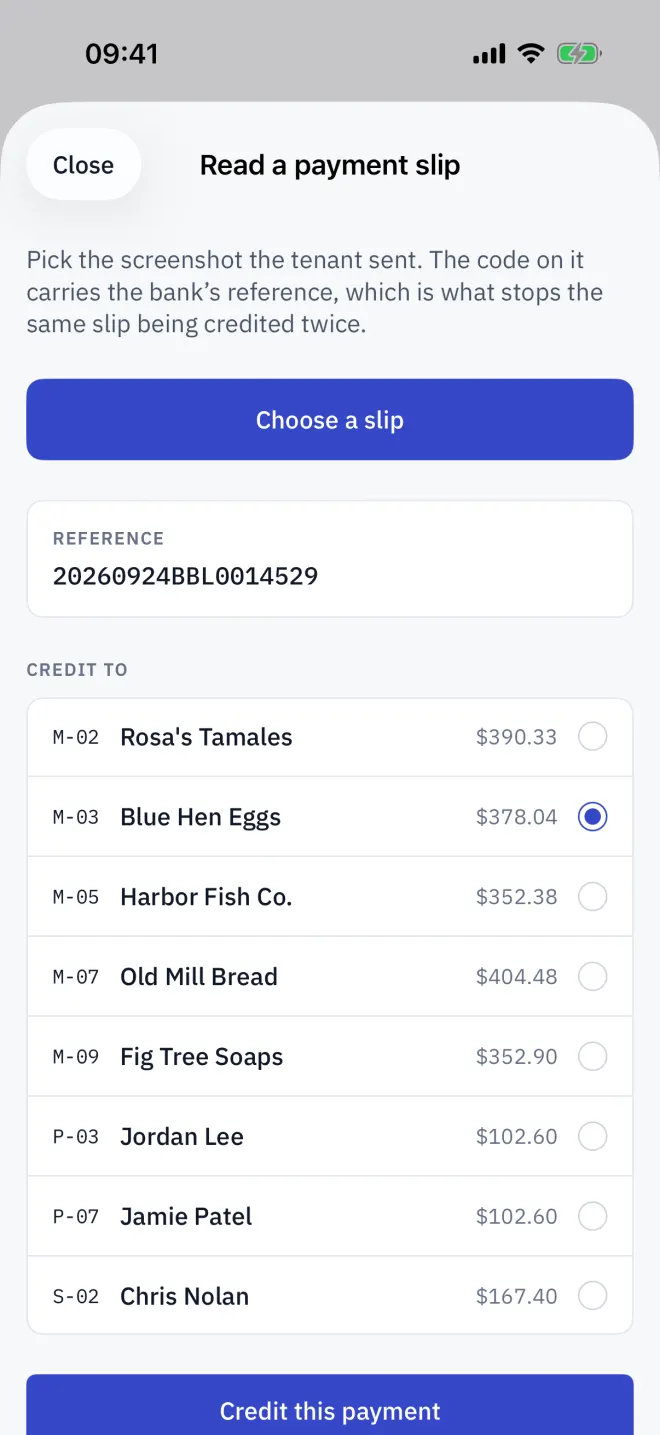
Tap Choose a slip and pick the slip image from Photos. Letnook reads the QR code printed on it.
-
3Check
Check the reference
The Reference card shows what was read. Compare the slip's amount with the space's bill yourself.
-
4Credit
Credit the space
Under Credit to, pick the space that paid and tap Credit this payment. The space turns Paid.
Why it cannot be credited twice
The reference is saved with the payment. If the same slip is read again, Letnook says That reference has already been credited. and will not credit it to any space.
What it does not do
- It reads the slip's QR code only — not the printed text or the amount.
- It lists only spaces owing this period; pay earlier-period arrears from the payment sheet.
- It does not check the bank. Confirm the transfer in your own banking app first.
Read next
Recording a payment
Take a payment in Letnook: show a QR code with the exact amount (PromptPay, QRIS, Pix, VietQR, KHQR), your own QR, bank details or cash, then mark it received.
NextThe collection round
Work through Letnook's Collect tab: the outstanding total, filters for overdue, not billed and paid spaces, arrears from earlier periods, and Collect next.
NextTroubleshooting
Fixes for common Letnook problems: a space stuck on Not billed yet, a greyed payment method, a slip that will not read, a period that will not close, sync and restore.