The collection round
The Collect tab is the round in one list: what is still owed this period, worst first, with the arrears from earlier periods above it.
What the tab shows
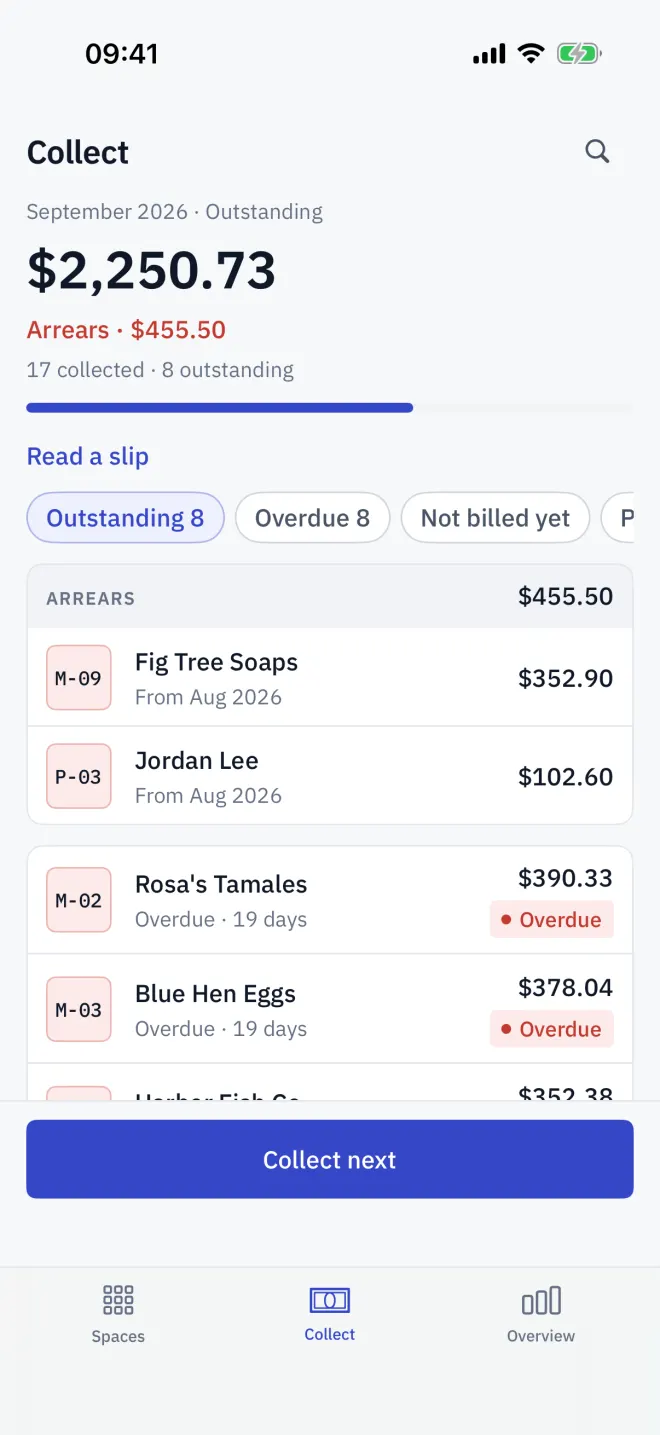
At the top is the period and the amount still Outstanding, with Arrears from earlier periods shown beneath it when there are any. A bar shows how much of what was billed has been collected, and Read a slip sits alongside.
Filters
| Filter | Shows |
|---|---|
| Outstanding | Due and overdue spaces, the longest overdue first. Arrears appear above them. |
| Overdue | Only spaces past their due day. |
| Not billed yet | Let spaces still waiting on a reading or turnover. |
| Paid | Spaces already paid this period. |
A practical order
-
1Inputs
Finish the inputs
Check Not billed yet first. Tap each space and record its reading or declare its turnover, so every bill has a total.
-
2Collect
Collect next
Tap Collect next to open the payment sheet for the next space on the list, or tap any row.
-
3Slips
Credit forwarded slips
When a tenant sends a transfer screenshot, use Read a slip to credit it to their space.
-
4Arrears
Chase arrears
When this period is settled the button becomes Collect arrears and opens the oldest unpaid bill from an earlier period.
When nothing is left, the tab says Everything is settled.
Read next
Recording a payment
Take a payment in Letnook: show a QR code with the exact amount (PromptPay, QRIS, Pix, VietQR, KHQR), your own QR, bank details or cash, then mark it received.
NextArrears from earlier periods
When a Letnook period is closed, unpaid bills become arrears. See them on Collect and on the space, collect them in full, or settle them from the deposit.
NextClosing the period
Close the Letnook period from Overview: bills are sealed, unpaid ones become arrears, meters roll forward, one-off fees clear and the next month opens.