Letting a space
A space is let as soon as it has a tenant name. From then on Letnook bills it every period, using the charges set on the space.
Put a tenant in
-
1Open
Open the space
Tap a vacant cell on the plan, then Edit space.
-
2Tenant
Add the tenant
Under Tenant, type the Tenant name and, if you want it on hand, a Contact and a Note.
-
3Details
Fill the kind's details
A stall has Area (m²) and Trade; a parking bay has Plate and Vehicle; a storage unit has Area (m²). Search finds a space by any of them.
-
4Charges
Check what it pays
Under What this space is charged, check the base rent and any other lines. See the charge rules article for each kind of line.
-
5Save
Save
Tap Save. The cell leaves Vacant and shows Due, or Not billed yet if a line still needs a reading or turnover.
The space screen
Tap any let space to see its status, the tenant, and Due this period. The main button is Record payment; Bill / receipt and Edit space sit beside it. The More actions menu holds Add a late fee, Give a discount, Undo payment and Move out.
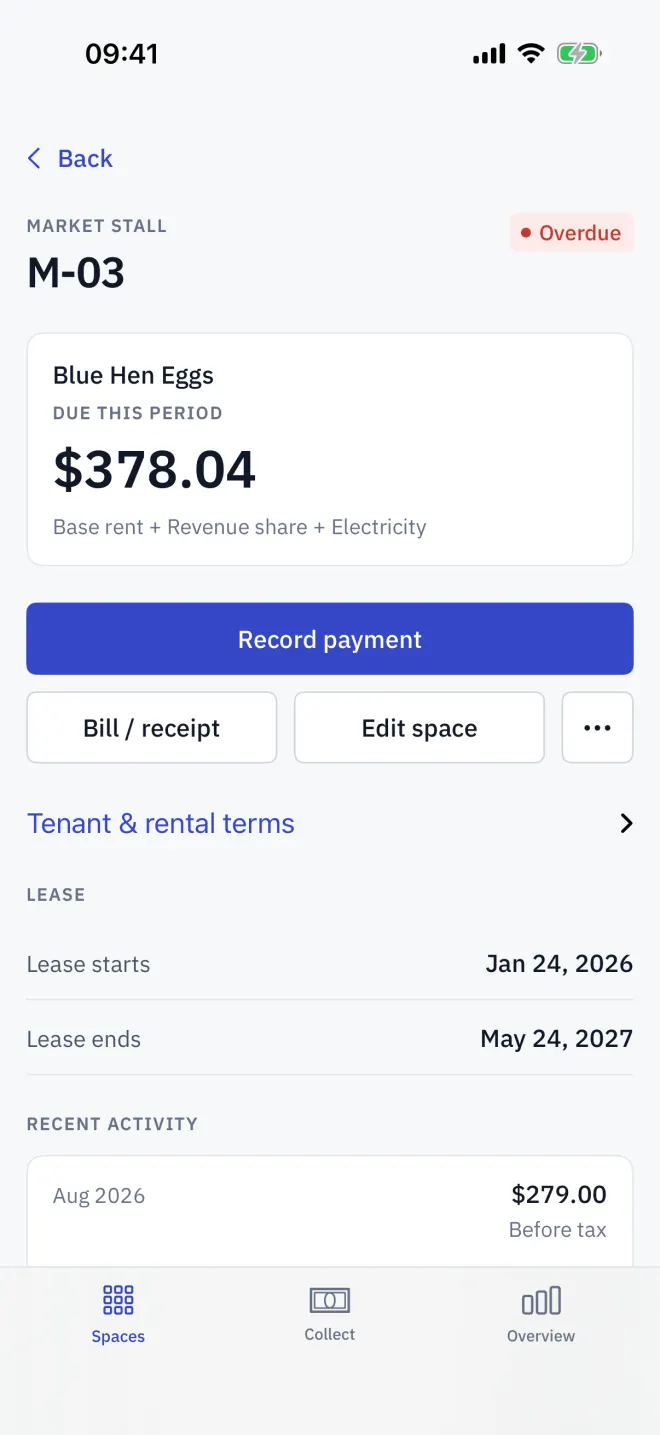
If a line is missing an input, the screen says Waiting on and names it, and shows a button such as Record Electricity reading or Declare turnover.
When a tenant leaves
Read next
Lease, deposit and documents
Record a Letnook tenant's lease start and end, the deposit held, and attach photos of the contract or ID. See when a lease is about to end.
NextCharge rules
Set what a Letnook space is charged: base rent, a revenue share of declared turnover with a cap, metered electricity or water, fixed extras, late fees and discounts.
NextMove-out and deposits
End a Letnook tenancy with a move-out statement: final bill, deposit held, deductions, arrears settled from the deposit, and the refund or balance due.